IoT Companion App Requirements: A Checklist for Hardware Teams

6 min read
Quick answer
Before estimating an IoT companion app, prepare working devices, protocol or SDK documentation, firmware versions, sample data, cloud API details, and an engineering contact.
Define device setup, readings, disconnected states, recovery, and phone testing. Radio protocols, firmware updates, and regulated uses need explicit scope; a device interface does not establish those capabilities.
- Map responsibilities across the app, device, cloud, and hardware supplier.
- Record missing dependencies as discovery work and agree physical-device acceptance tests.
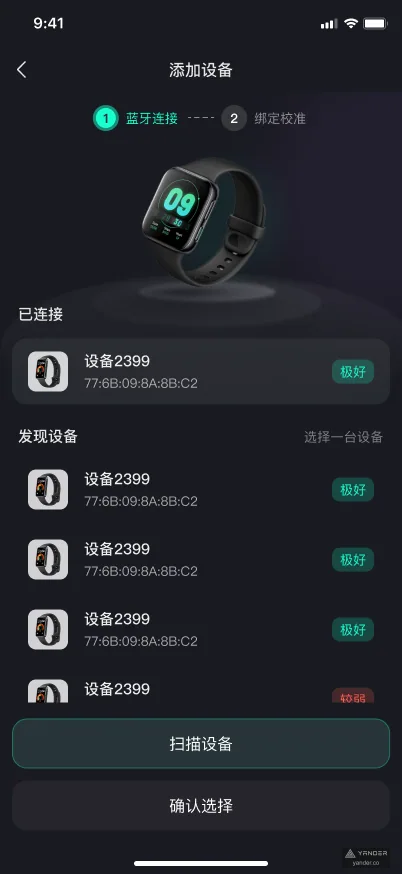
A reading on a phone is useful only when the customer understands which device produced it, whether it is current, and what to do when the connection breaks.
The checklist below turns those product questions into a shared app, device, and cloud brief. Treat missing samples, documents, and supplier decisions as visible dependencies.
Prepare a device and interface pack
List the hardware models, firmware versions, intended markets and operating conditions for the first release. Supply working sample units and identify an engineer who can answer protocol questions.
Include test credentials, SDK licensing conditions, sample messages and a description of how the current prototype behaves.
Draw the connection path from device to phone to cloud. Identify where commands are sent, measurements are interpreted, accounts are checked and history is stored.
A direct phone connection and a cloud-connected camera create different requirements. Agree the source of truth for status instead of letting each interface invent its own interpretation.
| Dependency | Questions to settle | Evidence to agree |
|---|---|---|
| Protocol or SDK | Documentation, supported operations, versions and vendor support | Working sample, current documents, and a supplier engineer |
| Device identity | How units are identified, claimed, shared and transferred | An agreed claim, sharing, and ownership-transfer example |
| Measurements | Units, timestamps, calibration, sampling and validity indicators | Sample payloads and a shared definition of valid readings |
| Cloud services | Authentication, APIs, storage, events and service ownership | API access and an app/device/cloud responsibility map |
Describe onboarding through the first reliable reading
The IMU Motion Health case shows an experience spanning device addition, connection, calibration, live movement and historical reports. It is useful design evidence for a staged setup journey.
Ask separately which implementation and hardware responsibilities are needed for your device; the published interface does not prove BLE, firmware or medical certification work.
Write the happy path and the points where the customer needs help: device not found, wrong unit selected, missing permission, low battery, incorrect placement or an interrupted calibration.
Explain what makes a reading ready and what invalidates that state. Avoid displaying an old measurement as if it were a new live result.
Define whether one phone can manage several devices, whether a device can belong to several users, and how ownership changes. Include replacement, resale, reset and support scenarios where relevant.
These account rules are easier to agree before they become confusing recovery flows.
Make connection and offline behaviour explicit
Distinguish physically connected, internet available, cloud reachable and data fresh. Each state can require a different customer action.
Specify what happens when the phone locks, the app moves into the background, the device leaves range or the network returns. Establish which behaviours are feasible for the selected platform and protocol.
If Bluetooth is part of the chosen design, review Android’s Bluetooth permission guidance against the target operating systems. Permission handling belongs in the setup and test plan.
A user who declines access should see an understandable route forward, rather than an indefinite connection spinner.
Decide what can be captured offline, where it waits and how records are synchronised. Document duplicate handling, timestamps and the treatment of partial sessions.
Customers and support staff should be able to distinguish a delayed upload from missing device data.
- Show the most recent successful update and the meaning of stale data.
- Define cancellation, reconnection and manual recovery steps.
- Agree whether offline operation is supported or requires a clear unavailable state.
Specify readings, history and alert meaning
The AI Horse Monitoring case combines camera onboarding, live and recorded video, behaviour events and reports. This highlights another companion-app pattern: move from a current observation to a reviewable event and its history.
Camera recording and sensor samples should not be budgeted as though they have the same storage and delivery needs.
Define units, time zones, session boundaries and how corrections appear in historical records. State which processing happens on the device, in the app or in a cloud service.
For AI-derived observations, agree how uncertainty and unavailable results are shown, and how users can inspect the supporting information.
For alerts, describe the condition, recipient, delivery channel, acknowledgement and follow-up. Include repeat alerts, a disconnected device and notification permissions.
Separate a customer-facing observation from any diagnostic or safety claim; intended use and specialist requirements must be assessed for the actual product.
Build a physical-device acceptance matrix
Agree the phone models, operating systems, hardware revisions and firmware versions to test. Include different battery levels, permission states, interrupted setup, repeated sessions and reconnects.
Test with physical hardware as well as simulated responses. A simulator is useful for controlled failures, but cannot establish all radio, camera or sensor behaviour.
Provide a reproducible procedure for reporting problems: app version, phone model, hardware identifier, firmware, steps, expected state and available diagnostic evidence. Keep credentials and unnecessary personal data out of shared logs.
Decide who can reproduce a firmware problem and how the teams will separate app, device and cloud defects.
If over-the-air firmware updates are required, scope the delivery mechanism, compatibility rules, interruption recovery and ownership explicitly. Treat this as a separate engineering workstream requiring evidence and testing.
Do not assume an app team controls a supplier’s firmware or can repair every failed update.
- Prove onboarding and calibration with representative production-like units.
- Test disconnected, stale, denied-permission and interrupted-session states.
- Verify that support can identify an affected app, device and firmware combination.
Assign release, security and support responsibilities
Record who owns the app repository, device firmware, SDK agreement, cloud environment, signing materials and store accounts.
Decide how device credentials are provisioned and revoked, how access is limited, and what happens when a customer removes a device or closes an account. Set retention and deletion expectations for recorded video and sensor history.
Agree compatible version combinations and how updates will be announced, tested and released. An app release and a factory firmware change may have different owners and schedules.
Keep a supported-version list, a rollback or recovery approach where feasible, and a clear escalation contact for each supplier dependency.
Use the app development cost guide to include hardware samples, test time, cloud data and maintenance in the budget. If AI analysis is part of the product, also use the AI app MVP checklist.
The final brief should identify what is known, what requires discovery and who can resolve each open question.
Put this into practice
Explore the related work and delivery scope.
- Mobile app development
Discuss app, backend and hardware dependency boundaries.
- IMU Motion Health
Review device onboarding, calibration and motion-report design.
- AI Horse Monitoring
See camera, live video, behaviour events and report workflows.
- Choose an app development company
Assess relevant evidence and delivery responsibilities.
- App development cost in China
Include integrations, physical devices and ongoing operations.
- AI app scope and operating costs
Plan evaluation and usage where the product uses AI.
Sources and scope
- IMU Motion Health app
Published connection, calibration, monitoring, and report interfaces. These screens do not prove a radio protocol, firmware scope, or certification.
- AI Horse Monitoring
Published camera, live-view, event, and report workflows. It does not establish the requirements or certification of another hardware product.
- Android Bluetooth permissions
Official Android permission requirements vary with target SDK and Bluetooth operations; checked 10 November 2026.
Prepare your hardware companion app brief
Share the device, intended users, connection documentation and first useful journey. Include current firmware and sample-unit availability.
Discuss a companion app