AI page generators need an operating system behind the page: lessons from Unico

6 min read
A page generator can produce a storefront quickly while leaving a merchant with nowhere to manage an order. For a commerce or booking product, the useful outcome is a customer request that reaches the right person with the right state and information.
Unico connects a visual storefront builder to bookings, orders, payments, customer records, and a merchant dashboard. Its published case is evidence for that connected platform; it does not establish an AI generation feature. Here, AI page generation is a proposed product scenario, using Unico’s documented operating flows as a reference.
Start with what happens after the customer clicks
Choose the transaction before the generated layout. A product order, service appointment, and event registration need different fields and state changes. Ask what information the merchant needs to accept, fulfill, or decline the request.
Map one customer action all the way into the operating workspace. For a service booking, this may include selecting a service, checking a time slot, providing contact details, and receiving confirmation. The merchant then needs a way to inspect, update, or cancel the booking.
Generate within a controlled content model
If AI creates a storefront, its output should fit the product’s supported components and data model. Let it propose copy or choose an approved section; keep product prices, stock, service availability, and payment rules connected to their authoritative records.
Give the merchant a preview and editing controls before publication. A generated promise about a refund, delivery area, or available service should not become live policy without review. Decide which fields can be suggested and which must be supplied or confirmed by the operator.
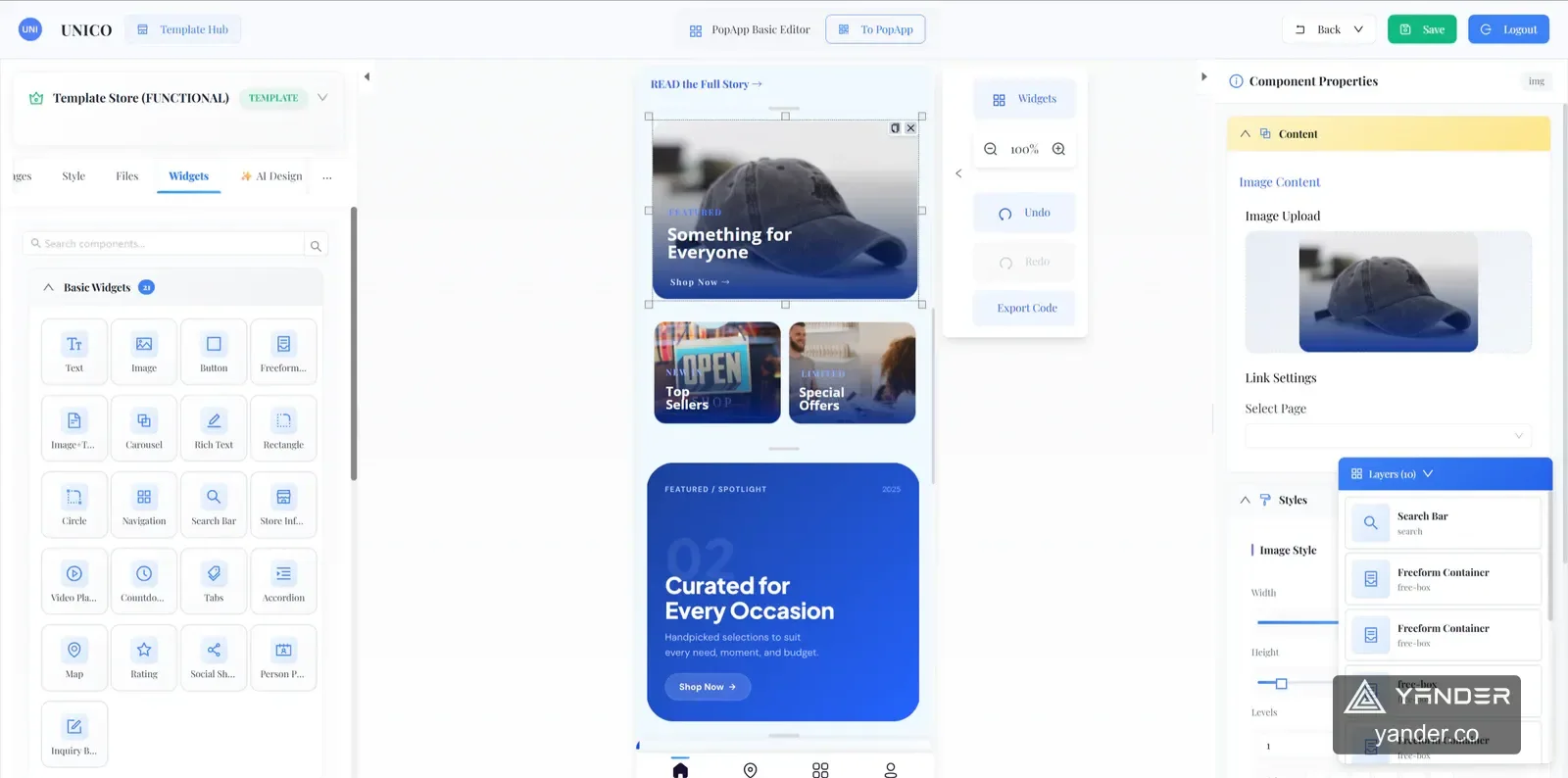
Unico’s visual builder and storefront screens show why a structured editing surface matters: the page is one view of a product that a merchant must continue to manage.
Define the order lifecycle independently of the page
Write down the states of the transaction and the events that move it forward. Include pending payment, confirmed, canceled, fulfilled, and any states that your chosen workflow actually needs. State who can change them and what the customer sees.
Keep the payment confirmation and the operational state coordinated. Design for a repeated payment notification, a customer returning before confirmation, and an unavailable payment provider. The implementation must not create two orders or mark an unconfirmed payment as successful.
| Customer surface | Operating requirement |
|---|---|
| Product or service page | Authoritative offering, availability, and pricing |
| Checkout or booking form | Validated inputs and a persisted request |
| Confirmation screen | A state that agrees with the backend |
| Merchant dashboard | Ownership, status changes, notifications, and an audit trail |
Use an end-to-end example to test the product
Unico’s PopEvent module brings event pages, ticket types and registration, QR check-in, attendance counts, and ticket payments into one web experience. It makes the path beyond publication visible: a ticket needs to remain usable when an attendee arrives.
For your own first release, choose one equally complete path. Run it with a customer, an operator, and an exception: a changed time, a duplicate request, or a canceled transaction. Ask the team to demonstrate what each person sees, rather than reviewing the storefront alone.
Keep reporting definitions consistent. Page views, started checkouts, confirmed orders, and completed transactions answer different questions. Agree which state drives each dashboard measure before it becomes a business report.
Prepare a brief for the platform behind the generator
Provide the intended merchant type, transaction rules, payment approach, required roles, customer communication, languages, and systems that already store products or bookings. Include example transactions and the people responsible for operating them.
The custom software and SaaS service is relevant when you need the connected product and merchant workspace; the website design and development service covers a public website engagement. Define which outcome you are commissioning so proposals include the required operating work.
Put this into practice
Explore the related work and delivery scope.
- Unico storefront and merchant operations
Explore the visual builder, bookings, orders, and event workflow.
- Custom software & SaaS
Scope the connected platform beyond the public page.
Connect your generated page to real operations
Share the customer action, transaction rules, payment needs, and the team that will handle requests. We can discuss the full platform scope.
Discuss your commerce or booking product